script monkey: business solutions using digital intelligence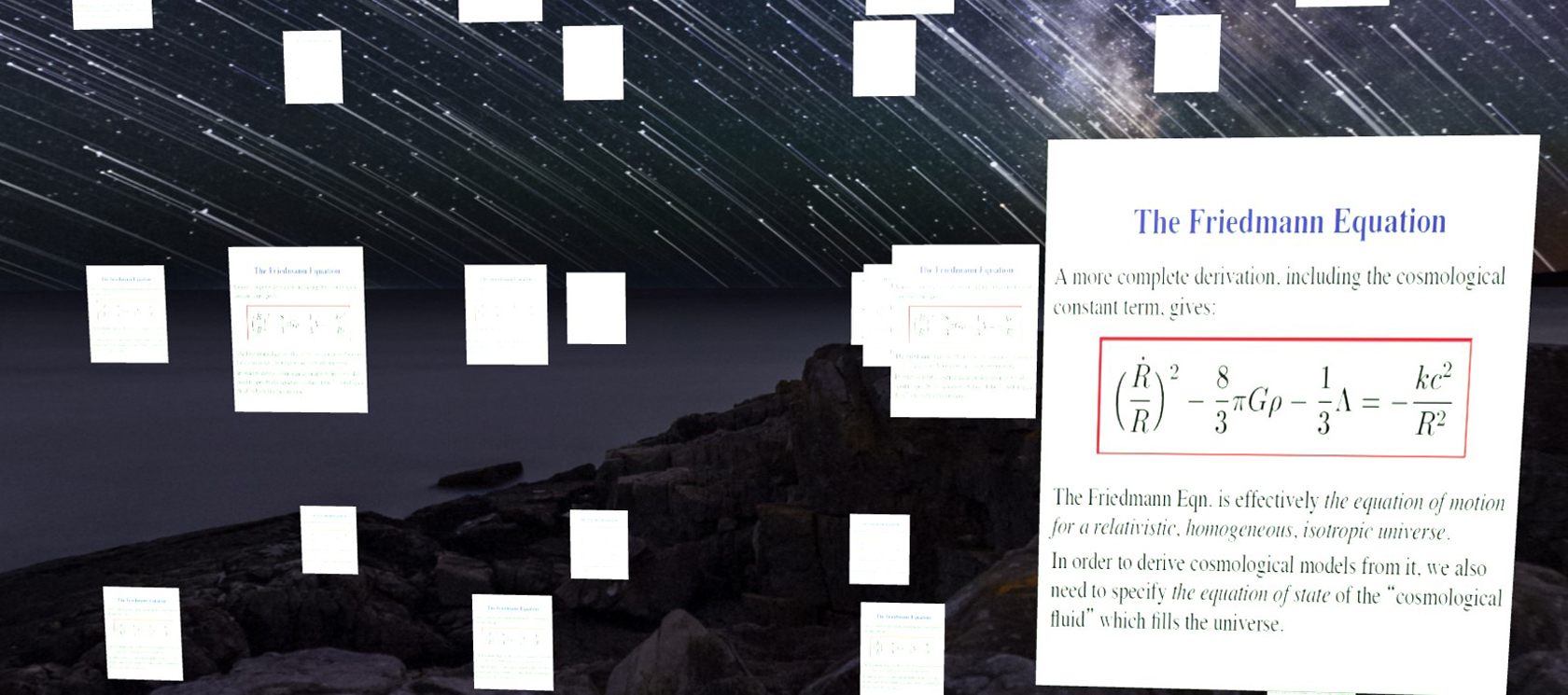
Exploring whether 3D Document Management is Possible
Instead of storing text in databases, what if we could place and group documents in a 3D environment?
15th August 2021
My desk is littered with piles of paper and resources from various projects, usually about 5 different things at a time. It looks messy, but I know where everything is! What if we could do the same in a database?
I have always been fascinated by geometry and visual representations of structures. More and more over the past few years, I have wondered if we could store data the way our brains work: discursively, so is 3D document management possible?
When I think of a subject, memories related to that subject well up, whether they are emotions, smells, thoughts, ideas, or events, they are linked by the subject and each is linked in turn, to other memories.
Organising data in a similar fashion is not a common idea, but with the advent of AI, it will likely be that our approaches to digital memory will change, and we will be less reductionist in our approach.
Traditional file systems are rigidly hierarchical: a document lives in one folder, inside another folder, inside another. Yet most documents belong to several subjects at once, and the moment we file them away, we lose all but one of those connections. A three dimensional space offers room for a document to sit near everything it relates to, rather than in a single drawer.
An old idea, finally within reach
This is not a new dream. In 1945, the American engineer Vannevar Bush described the "memex", an imagined desk that would store a person's books, records and letters, and link them together in associative trails, just as the mind does. It was decades ahead of the technology needed to build it.
Long before that, ancient Greek orators used the "memory palace", placing ideas in rooms of an imagined building so they could walk through their speech in their mind. We remember places far more easily than lists, and a 3D document space plays to that strength. You may not recall a file name, but you might well remember that it sat up and to the left, near the contracts.
Descartes might not be proud:
In the viewport below, a 3D equirectangular image creates a world within which 64 papers have been rendered, each showing the same image (for now). Each represents a different PDF.
You can pan (right click), zoom (mouse wheel) and rotate (left drag mouse) using a mouse with a wheel to move around the environment.
Find a PDF on your desktop, drag it into the middle of the viewport and release the mouse button, the PDF will be sucked into my 3D world.
From this point, it is computationally trivial to upload the PDF, OCR/read it, save the text to a database and allow free text search for the users.
The more interesting step comes next. Once the text is extracted, AI can identify themes shared between documents and draw them closer together in the space, so related papers naturally drift into clusters, much like memories gathering around a subject.
How AI could arrange the space
Modern AI models can turn a passage of text into a long list of numbers, known as an embedding, which captures what the text is about rather than the exact words it uses. Two documents about the same subject end up with similar numbers, even if they share hardly any vocabulary. Those lists are far too long to picture, but well established techniques can squash them down to just three values: an x, a y and a z. Suddenly every document has a natural position in space, and similar documents become neighbours without anyone filing them.
Questions worth asking
Wouldn't thousands of documents become a cluttered mess?
Possibly, which is why zoom matters. From a distance you would see broad clusters by subject, and as you fly closer, individual papers would come into view, much like moving from a map of a country down to a single street.
Isn't a search box good enough?
Search is brilliant when you know what you are looking for. A 3D space helps with the things you did not know to look for, the related report sitting next to the one you opened.
Could this work in virtual reality?
Very naturally. The scene is already built in 3D with Three.js, so walking through your documents with a headset is a smaller step than it sounds.
I'd say this proof of concept is a given!
If you would like to see how scenes like this are built, start with our guide to animating a cube in Three.js. And if you have a mountain of documents of your own, our bespoke database applications can make them searchable today, in two dimensions or three.